Cherrio Brush: A Perfect Font for Your Creative Web Designs
As a web designer, I'm always on the lookout for fonts that can add a unique and engaging touch to my projects. Recently, I had the opportunity to test Cherrio Brush, a fun and lively brush font with a natural handmade feel. This typeface is perfect for any summer-themed or creative design, and I was eager to see how it would perform in a real website layout.
Visual Personality and Style of Cherrio Brush
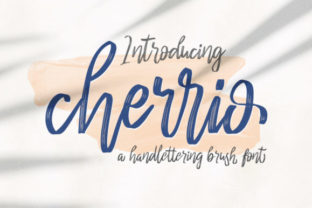
Cherrio Brush has a charming, hand-painted look that brings a sense of warmth and creativity to any design. The brush strokes are smooth and fluid, giving each letter a playful yet refined appearance. This font is ideal for adding a personal, artisanal touch to your web projects, making it particularly suitable for boutique online stores, creative portfolios, and lifestyle blogs.
Testing Cherrio Brush in Real Web Layouts
I decided to test Cherrio Brush in a variety of web elements to see how it would hold up in different contexts. First, I used it in the hero section of a boutique online store. The large, bold letters of "Welcome to Our Shop" immediately caught the eye, creating a welcoming and inviting atmosphere. The natural, handwritten style of the font made the page feel more personal and less corporate, which is exactly what many small businesses aim for.
Next, I tried using Cherrio Brush in a landing page headline. The font's playful and energetic vibe worked perfectly for a summer campaign promoting a new line of beachwear. The headline, "Embrace the Sun with Our New Collection," stood out beautifully, drawing the user's attention and setting the right mood for the rest of the page.
Readability and Visual Hierarchy
One of the key considerations when using decorative fonts like Cherrio Brush is readability. While this font is highly appealing, it may not be the best choice for long paragraphs or dense text. Instead, it shines in short, impactful phrases and headings. For instance, I found that using Cherrio Brush for section headings and call-to-action buttons added a dynamic and engaging element to the page without overwhelming the reader.
When it comes to mobile responsiveness, Cherrio Brush performed well. The font's clean lines and balanced spacing made it easy to read on smaller screens. However, I did make sure to use it sparingly, primarily for headlines and key messages, to ensure that the overall user experience remained seamless and accessible.
Font Pairing and Design Consistency
To create a balanced and professional design, I paired Cherrio Brush with a clean sans serif font, such as Roboto or Lato. This combination allowed the decorative elements of Cherrio Brush to stand out while maintaining a readable and consistent body text. For example, in a coaching website, I used Cherrio Brush for the main heading, "Transform Your Life with Personal Coaching," and Roboto for the supporting text and testimonials. The result was a harmonious and visually appealing layout that effectively communicated the brand's message.
For a more editorial and sophisticated look, I also experimented with pairing Cherrio Brush with a simple serif font like Merriweather. This combination worked well for a blog redesign, where the handwritten style of Cherrio Brush added a personal touch to the post titles, while the serif font provided a classic and elegant feel to the article content.
Practical Considerations and Best Practices
Before incorporating Cherrio Brush into your web projects, there are a few practical considerations to keep in mind. First, check the included styles, alternates, and ligatures to see if they meet your design needs. Additionally, ensure that the font supports the languages you need, especially if you have a global audience. Lastly, verify the commercial licensing terms to make sure you can use the font for your specific project, whether it's a client's website, an online store, or a digital product.
For optimal performance, consider using Cherrio Brush as a webfont. This ensures that the font loads quickly and displays consistently across different devices and browsers. If you're using a platform like WordPress or a website builder, most modern tools offer easy integration for custom webfonts.
In conclusion, Cherrio Brush is a versatile and visually appealing font that can add a unique and creative touch to your web designs. Whether you're working on a boutique online store, a creative portfolio, or a promotional landing page, this font can help you create a memorable and engaging user experience. Just remember to use it judiciously and pair it with a clean, readable font to maintain a balanced and professional design.